
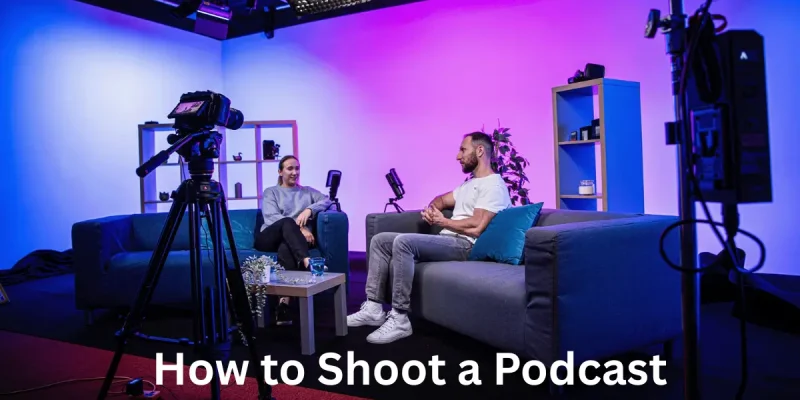
Shooting a podcast means recording your voice to share stories, ideas, or fun talks with others. It can be about anything you love like sports, games, music, or learning new things. To make a good podcast, you need some simple tools, a quiet space, and a clear plan. Here are explain How to Shoot a Podcast in this article with complete details.
Planning Your Podcast
Before recording, it’s smart to plan your podcast. Planning helps you stay focused and makes your podcast easier to follow and more fun to hear.
- Pick a topic you enjoy
- Decide the length of each episode
- Write a few notes or script
- Choose a fun and easy name
- Know who your audience is (kids, teens, etc.)
Choosing Equipment
You need the right tools to shoot a podcast. Good equipment helps your voice sound clear. You do not need expensive gear just things that work well.
- A mic (microphone) that is easy to use.
- A stand or boom arm to hold the mic.
- Pop filter to cut “P” and “B” sounds.
- Headphones to hear yourself while speaking.
- A quiet place for better sound.
Setting Up Your Recording Space
Your room matters when you shoot a podcast. A quiet room without echo makes your voice sound fresh and clear. Preparing your space makes a big difference.
- Pick a quiet room with soft furniture.
- Close windows, turn off fans or AC.
- Use pillows or blankets to reduce echo.
- Sit close to your microphone.
- Test voice sound before you start recording.
Recording the Podcast
Recording is the time you speak into the mic and capture your voice. You must speak clearly in a calm, natural way. Good recording makes editing easy later.
- Open your recording software (e.g., Audacity, GarageBand).
- Press record and wait 2 seconds before speaking.
- Talk in a calm, steady voice.
- Watch your mic level so it doesn’t peak (got too loud).
- If you make a mistake, pause and keep going.
- Speak like you talk to a friend.
Editing Your Audio
Editing cleans up your podcast. You remove mistakes, pauses, and background noise. This makes it easier to listen to and enjoy.
- Listen to the full recording once.
- Cut out long pauses and “ums” or mistakes.
- Use noise‑reduction to remove hums.
- Add short music intro or outro if you want.
- Adjust volume so speech is even.
- Save your file as MP3 or WAV.
Publishing Your Podcast
After editing, you need to share your podcast online. Publishing lets people find and hear your episodes on apps and websites.
- Choose a podcast host (e.g., Buzzsprout, Anchor).
- Upload your audio file.
- Write a title and a short description.
- Add the episode number and date.
- Use a cover image (simple and clear).
- Publish and get RSS feed link.
Promoting Your Podcast
After publishing, tell others about your podcast. Promotion helps more people listen and follow your show.
- Share link on social media (Facebook, Instagram).
- Ask friends and family to listen.
- Post short audio clips to attract interest.
- Ask listeners to leave a review.
Reviewing and Improving
Once your episode is out, check what worked and what didn’t. This helps you make each new episode a little better.
- Review listener feedback and comments.
- Check download numbers.
- Notice which topics had more listens.
- Learn what listeners like and don’t like.
- Try new ideas in future episodes.
- Keep practicing and improving.
Staying Regular and Consistent
Making podcasts is easier when you stick to a schedule. Consistency helps your audience know when to expect your next episode.
- Decide a release day (like every Friday).
- Plan episodes ahead of time.
- Keep a simple calendar with dates.
- Batch‑record if possible (record several at once).
- Always let listeners know what’s next.
Engaging with Your Audience
Talking with your audience helps your podcast grow. Listeners feel happy and stay connected when you listen to them back.
- Ask listeners their ideas or questions.
- Read messages or comments on your show.
- Do simple polls or surveys.
- Thank listeners in each episode.
- Mention a listener in your podcast.
Advantages and Disadvantages of Shooting a Podcast
Shooting a podcast has some good sides and some hard parts too. Knowing both helps you decide if podcasting is right for you.
✅ Advantages of Shooting a Podcast
There are many good things about starting a podcast. It’s fun, simple, and helps you share your voice with others.
- Easy to start with basic tools
- Lets you share your ideas freely
- Builds your confidence and speaking skills
- Can reach many people online
- Great for learning and teaching others
❌ Disadvantages of Shooting a Podcast
Podcasting also has some challenges. It needs time, effort, and practice to make it better.
- Takes time to plan and edit
- Needs a quiet space
- Can be hard to grow audience at first
- Must be regular and consistent
- Some tools might cost money
FAQs About How to Shoot a Podcast
Many people have questions when they start making a podcast. It’s okay to be curious! Below are some simple and helpful answers to common questions about shooting a podcast.
Q1: Do I need a fancy mic to start a podcast?
No. A simple, good-quality USB mic is enough for beginners. Just make sure your voice sounds clear.
Q2: Can I shoot a podcast on my phone?
Yes. You can use your phone with a recording app and headphones. Try to record in a quiet place.
Q3: How long should my podcast be?
Most podcasts are 10 to 30 minutes long. Keep it short and interesting for your listeners.
Q4: Do I need music in my podcast?
Music is not a must, but a short music intro or outro can make your podcast sound nicer.
Q5: What if I make a mistake while recording?
It’s okay! You can edit the mistake later using simple audio editing software.
Q6: How often should I post a new episode?
Try to post once a week or every two weeks. Stay regular so your audience knows when to listen.
Q7: Where do I publish my podcast?
You can use free podcast hosts like Anchor or Buzzsprout to upload and share your episodes.
Q8: Can I talk about any topic?
Yes. Choose topics that you like and that others will enjoy too. Make sure they are easy to understand.
Q9: Do I need to write everything before speaking?
No. You can use a short script or bullet points to guide you. Speak naturally and be yourself.
Q10: Can kids make a podcast too?
Yes! Anyone can make a podcast. Just plan well, speak clearly, and have fun.
Conclusion
Shooting a podcast can be fun, simple, and exciting. You don’t need fancy tools just a good plan, a quiet space, and a clear voice. When you choose topics you love and speak in a friendly way, people will enjoy listening. Keep learning, keep improving, and most of all, enjoy the process. Your voice matters, and your podcast can make others smile, learn, and think.